
If you want to create a Minecraft community server, choosing the right hosting is very important. A gaming server is like the “home” where your Minecraft world runs. If you choose the wrong one, players may face lag, crashes, or slow loading.
When selecting a Minecraft server, you must balance the following:
- Player capacity
- RAM & CPU performance
- Mod/plugin support
- NVMe SSD storage
- 9% uptime reliability
For small communities, 4–8GB RAM is usually enough. For large public servers, 16GB+ RAM and dedicated resources are recommended.
Now let’s understand everything step-by-step.
Table of Contents
Server Requirements Based on Community Size
| Community Type | Recommended RAM | CPU Requirement | Storage Type | Suitable For |
| Small Friends Group (5–10 players) | 4GB | Shared CPU | SSD | Vanilla survival |
| Medium Community (10–30 players) | 6–8GB | High-clock shared CPU | NVMe SSD | Plugins, mini-games |
| Growing Public Server (30–70 players) | 8–12GB | Dedicated threads | NVMe SSD | Modpacks & events |
| Large Public Server (70+ players) | 16GB+ | Dedicated CPU | NVMe SSD | Heavy modpacks, networks |
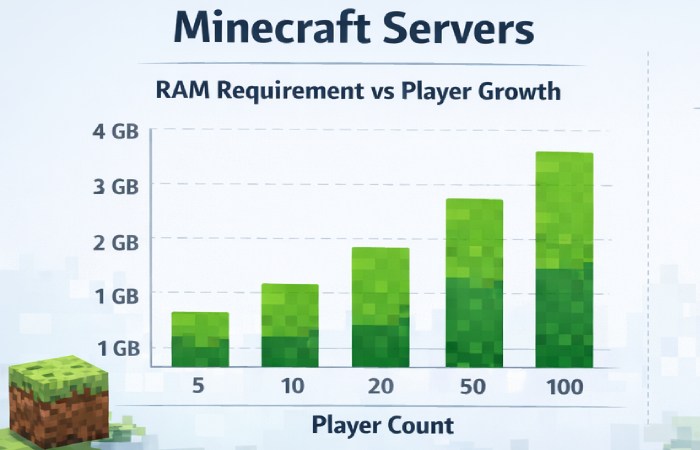
Tip: More players = more RAM + better CPU needed.
Important Server Specifications Explained
| Component | What It Means (Beginner Explanation) | Why It Matters |
| RAM | Memory used to run the game world | Prevents lag & crashes |
| CPU | Processor that handles calculations | Important for chunk loading |
| NVMe SSD | Fast storage type | Faster world loading |
| Uptime (99.9%) | Server online reliability | Avoid downtime |
| Bandwidth | Data transfer limit | Supports more players |
| DDoS Protection | Security from attacks | Keeps server safe |
RAM Requirement Growth vs Player Count
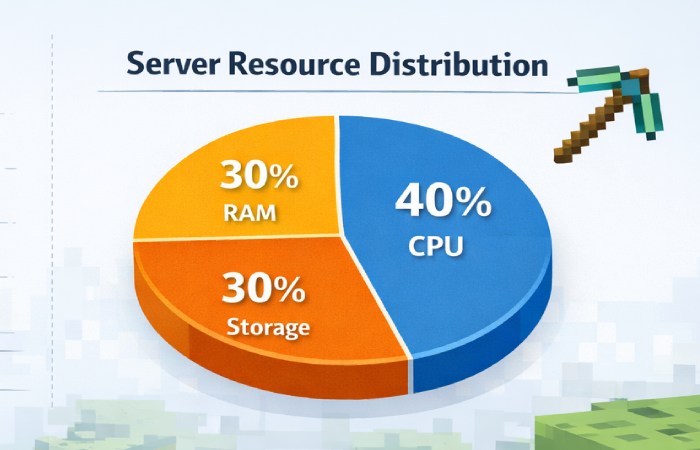
Server Resource Usage Distribution
Vanilla vs Modded Server Requirements
| Server Type | RAM Needed | CPU Demand | Storage | Best For |
| Vanilla (No Mods) | 4–6GB | Low | SSD | Casual players |
| Plugin-Based (Spigot/Paper) | 6–10GB | Medium | NVMe | Community features |
| Modded (Forge/Fabric) | 8–16GB+ | High | NVMe | Custom gameplay |
| Large Modpacks (100+ Mods) | 16GB+ | Dedicated CPU | NVMe | Advanced communities |
Hosting Types Comparison
| Hosting Type | Cost | Performance | Best For |
| Shared Hosting | Low | Limited | Small servers |
| VPS Hosting | Medium | Good | Growing communities |
| Dedicated Server | High | Excellent | Large public servers |
| Cloud Hosting | Flexible | Scalable | Expanding networks |
What to Look for in a Provider
| Feature | Minimum Recommendation | Ideal Recommendation |
| RAM | 4GB | 8–16GB |
| Storage | SSD | NVMe SSD |
| Uptime | 99.9% | 99.99% |
| Support | 24/7 Ticket | 24/7 Live Chat |
| Backups | Weekly | Daily Automatic |
| Control Panel | Basic | One-Click Mod Installer |
Choosing a Server for Indian Players
If your Minecraft community is in India:
| Factor | Recommendation |
| Server Location | Mumbai / Asia region |
| Latency | Below 50ms |
| Payment Options | UPI / Local cards |
| ISP Compatibility | Stable fiber connection |
Future-Proofing Your Minecraft Server
| Growth Stage | Upgrade Strategy |
| 10 players → 25 players | Upgrade from 4GB to 8GB |
| Add Modpack | Increase RAM by 50% |
| Events/Tournaments | Temporary CPU boost |
| Community Expansion | Switch to VPS/Dedicated |
Example Beginner Scenario
Imagine you are starting a Minecraft server for 15 friends.
- Choose 6–8GB RAM
- Use NVMe SSD storage
- Choose 99.9% uptime provider
- Install Paper (optimized server software)
- Enable automatic backups
If your community grows to 60+ players, upgrade to 16GB RAM and dedicated CPU.
FAQs
- Is 4GB RAM enough for Minecraft?
Yes, for small vanilla servers (under 10 players).
- Why is NVMe better than a normal SSD?
NVMe is much faster, reducing world loading time.
- Do mods require more RAM?
Yes, modded servers need at least 8–16GB RAM.
- What happens if uptime is low?
Players may experience frequent disconnections.
- Should I choose a VPS or a dedicated server?
VPS is good for growing communities. Dedicated is best for large public servers.
Conclusion
Choosing the right gaming server for your Minecraft community is about balancing performance, cost, and future growth. Small groups can start with 4–8GB RAM, but larger public servers require 16GB or more along with dedicated CPU resources. NVMe SSD storage ensures fast world loading, and a provider offering at least 99.9% uptime keeps your server reliable.
As your community grows, upgrading RAM and CPU becomes necessary to prevent lag and crashes. By understanding your player count, mod usage, and long-term goals, you can select a server that provides smooth gameplay and supports your Minecraft world as it expands.