


Table of Contents
Introduction
External drive data recovery is the process of retrieving lost, deleted, corrupted, or inaccessible files from an external storage device such as an external hard drive, SSD, or USB drive. Data loss can occur due to accidental deletion, formatting, virus attacks, file system corruption, or hardware damage.
External drives are widely used for backups, business data storage, media files, and project archives, which makes data recovery an essential service when data becomes inaccessible.
In many cases, data can be recovered using specialized recovery software or professional data recovery services, provided the lost data has not been overwritten.
Common Causes of External Drive Data Loss
| Cause | Description | Recovery Possibility |
|---|---|---|
| Accidental Deletion | Files deleted unintentionally | High |
| Drive Formatting | External drive formatted accidentally | High |
| File System Corruption | Drive becomes RAW or unreadable | Medium–High |
| Virus or Malware Attack | Files hidden or corrupted | Medium |
| Physical Damage | Drive dropped or exposed to water | Low–Medium |
| Power Failure | Sudden shutdown during file transfer | Medium |
| USB Cable/Port Failure | Drive not detected | High |
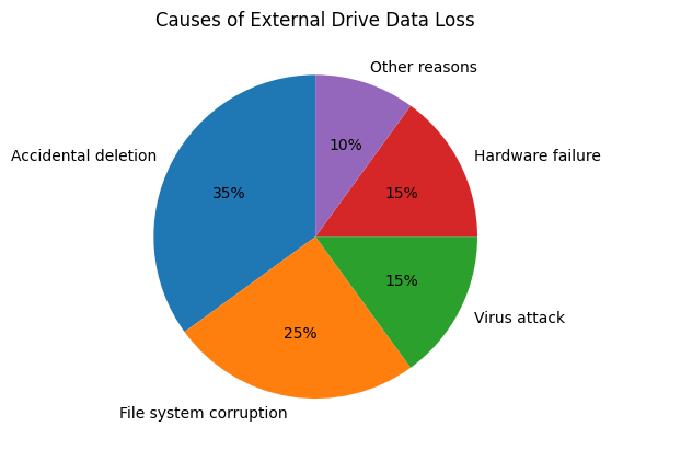
File system corruption and accidental deletion are among the most common causes of data loss on external drives.
Signs That Your External Drive Needs Data Recovery
| Symptom | What It Means |
|---|---|
| Drive asks to format before opening | File system corruption |
| External drive not detected | Connection or hardware issue |
| Files missing suddenly | Accidental deletion or malware |
| Very slow drive access | Disk sector errors |
| Clicking or grinding noise | Mechanical failure |
If the drive makes unusual noises, it is recommended to stop using it immediately and consult professional recovery services.
Step-by-Step Process to Recover Data from External Drive

| Step | Action | Explanation |
|---|---|---|
| Step 1 | Stop using the drive | Prevent overwriting lost data |
| Step 2 | Connect drive to computer | Use a stable USB port |
| Step 3 | Install recovery software | Example: Recuva, EaseUS |
| Step 4 | Scan the external drive | Quick scan then deep scan |
| Step 5 | Preview recovered files | Verify files before restoring |
| Step 6 | Save files to another drive | Never save to same drive |
When data loss occurs, the first and most important step is to stop writing new data to the drive, otherwise the lost files may be permanently overwritten.
Data Recovery Methods Comparison
| Recovery Method | Best For | Difficulty | Success Rate |
|---|---|---|---|
| Recovery Software | Deleted or formatted files | Easy | High |
| Command Tools | File system repair | Medium | Medium |
| Backup Restore | Files previously backed up | Easy | High |
| Professional Recovery Service | Physical damage | Hard | Very High |
Most beginners recover data successfully using software-based scanning tools.
Popular Data Recovery Software
| Software | Platform | Type | Price |
|---|---|---|---|
| Recuva | Windows | Free recovery tool | Free / $20 |
| EaseUS Data Recovery | Windows / Mac | Professional recovery | $70+ |
| PhotoRec | Windows / Linux / Mac | Open-source recovery | Free |
| Disk Drill | Windows / Mac | Advanced recovery tool | $80+ |
| GetDataBack | Windows | File system recovery | $79+ |
Open-source software like PhotoRec can recover hundreds of file types from storage devices using file carving techniques.
External Drive Data Recovery Service Providers
| Service Provider | Location | Service Type | Estimated Cost |
|---|---|---|---|
| Ontrack Data Recovery | Global | Professional lab recovery | $300 – $1500 |
| DriveSavers | USA | Clean-room recovery | $500 – $2500 |
| Stellar Data Recovery | Global | Software & lab recovery | $100 – $1500 |
| Secure Data Recovery | Global | Enterprise recovery | $400 – $2000 |
Professional recovery labs operate in clean-room environments where technicians repair damaged drives and extract data safely.
Estimated Data Recovery Cost
| Recovery Situation | Estimated Cost |
|---|---|
| Deleted files recovery | $50 – $150 |
| Formatted drive recovery | $100 – $300 |
| Corrupted file system | $200 – $600 |
| Physical drive damage | $800 – $2500 |
Physical damage recovery is the most expensive because it requires hardware repair and specialized equipment.
How to Prevent External Drive Data Loss
| Prevention Method | Benefit |
|---|---|
| Regular backups | Protects against permanent loss |
| Properly eject drive | Prevents file corruption |
| Use antivirus software | Protects from malware |
| Avoid physical damage | Prevents hardware failure |
| Use surge protector | Protects against power spikes |
Regular backups are the most reliable way to avoid permanent data loss.
How Data Recovery Services Work
| Stage | Description |
|---|---|
| Diagnosis | Technician analyzes drive damage |
| Cloning | Disk image created to avoid further damage |
| Data Extraction | Files recovered from disk sectors |
| Verification | Recovered files checked for integrity |
| Delivery | Data returned on new storage device |
Professional labs often create a sector-by-sector clone of the damaged drive before attempting recovery.
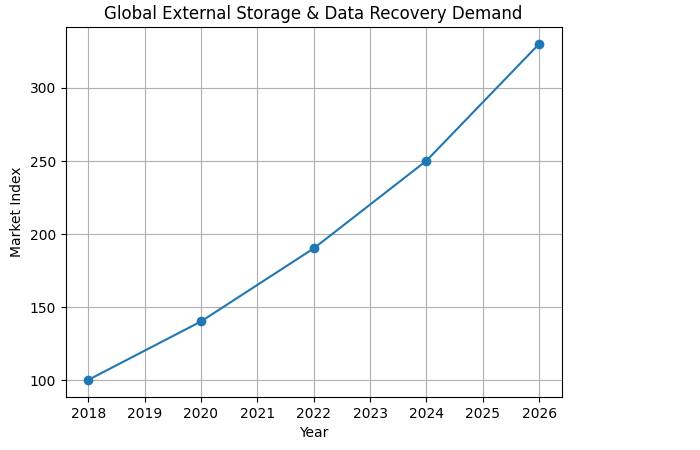
External Drive Market Growth
External Drive Failure Causes
Important Points About External Drive Recovery
-
Data recovery success depends on how quickly the recovery process starts.
-
Avoid writing new data to the affected drive.
-
Recovery software can restore most deleted files.
-
Physically damaged drives require professional service.
FAQs
Can deleted files from an external drive be recovered?
Yes. If the files have not been overwritten, they can often be recovered using data recovery software.
Is it possible to recover data from a formatted external drive?
Yes. Quick formatting usually does not erase the actual data immediately, so recovery tools can still retrieve files.
What should I do immediately after losing data?
Stop using the drive immediately to prevent overwriting the lost data.
Can physically damaged external drives be recovered?
Yes, but only through professional recovery laboratories that repair the hardware before extracting data.
How long does external drive data recovery take?
Software recovery usually takes a few minutes to several hours depending on drive size, while professional recovery may take several days.
Conclusion
External drive data loss can occur for many reasons, including accidental deletion, formatting, file system corruption, malware attacks, and hardware failure. Fortunately, modern data recovery techniques make it possible to recover most lost files when the recovery process begins quickly and the data has not been overwritten. Software-based recovery methods are effective for logical issues such as deletion or formatting, while professional recovery services are required for physically damaged drives. By following proper recovery procedures and maintaining regular backups, users can significantly reduce the risk of permanent data loss and ensure the safety of their important digital files.