

Table of Contents
Introduction
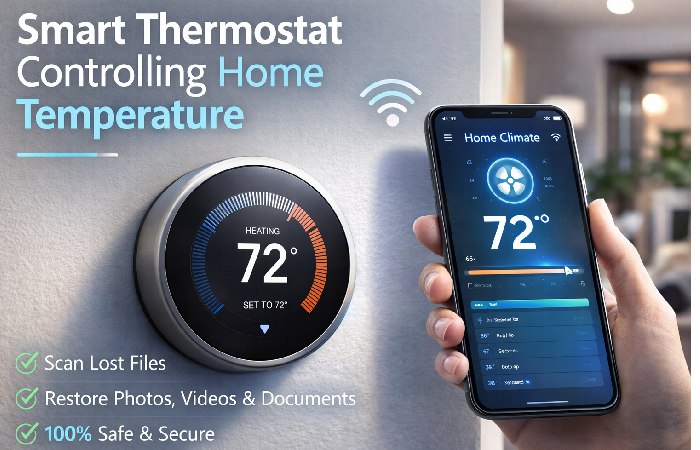
Smart thermostats are advanced temperature-control devices that automatically regulate heating and cooling systems using internet connectivity, sensors, and automation features. Unlike traditional thermostats, smart thermostats allow users to control home temperature remotely through mobile apps, voice assistants, or automated schedules.
These devices connect to Wi-Fi networks and integrate with smart home ecosystems such as Google Home, Amazon Alexa, and Apple HomeKit.
Smart thermostats help homeowners reduce energy consumption, improve comfort, and automate climate control by learning user habits and adjusting temperature automatically. Many modern devices also include energy usage reports and occupancy sensors.
Types of Smart Thermostats
| Thermostat Type | Description | Connectivity | Best Use Case | Approx Price |
|---|---|---|---|---|
| Wi-Fi Smart Thermostat | Connects to internet for remote control | Wi-Fi | Most homes | $120 – $250 |
| Learning Thermostat | Learns user habits automatically | Wi-Fi + AI | Automated temperature control | $200 – $300 |
| Programmable Smart Thermostat | Pre-set heating/cooling schedules | Wi-Fi | Energy saving | $100 – $200 |
| Voice-Controlled Thermostat | Controlled via voice assistants | Wi-Fi + Voice | Smart home integration | $150 – $280 |
Learning thermostats automatically adjust settings based on daily routines, helping reduce electricity usage.
Popular Smart Thermostat Devices
| Device | Display Type | Connectivity | Voice Assistant Support | Price |
|---|---|---|---|---|
| Google Nest Learning Thermostat | LCD | Wi-Fi | Google Assistant, Alexa | ~$249 |
| Ecobee Smart Thermostat Premium | Touchscreen | Wi-Fi | Alexa, Siri | ~$249 |
| Honeywell Home T9 Smart Thermostat | Touchscreen | Wi-Fi | Alexa, Google Assistant | ~$199 |
| Amazon Smart Thermostat | Digital | Wi-Fi | Alexa | ~$140 |
| Emerson Sensi Smart Thermostat | LCD | Wi-Fi | Alexa, Google Assistant | ~$129 |
Each device offers different automation capabilities, energy monitoring features, and compatibility with smart home systems.
Major Smart Thermostat Companies
| Company | Headquarters | Country | Popular Product |
|---|---|---|---|
| Mountain View | USA | Nest Thermostat | |
| Ecobee | Toronto | Canada | Ecobee Smart Thermostat |
| Honeywell | Charlotte | USA | Honeywell Home Thermostat |
| Amazon | Seattle | USA | Amazon Smart Thermostat |
| Emerson Electric | Missouri | USA | Sensi Thermostat |
These companies dominate the global smart thermostat market through smart home ecosystem integration and energy-saving innovations.
Key Features to Consider Before Buying
| Feature | Description | Recommended Value |
|---|---|---|
| Wi-Fi Connectivity | Enables remote control | Required |
| Mobile App Control | Adjust temperature from phone | Yes |
| Learning Capability | Adapts to user routine | Optional |
| Energy Reports | Tracks energy consumption | Recommended |
| Voice Control | Works with smart assistants | Optional |
| Geofencing | Adjusts temperature based on location | Recommended |
Energy reporting features help users monitor heating and cooling costs over time.
Smart Thermostat Price Comparison
| Category | Entry Level | Mid Range | Premium |
|---|---|---|---|
| Basic Smart Thermostat | $100 | $150 | $180 |
| Learning Thermostat | $180 | $230 | $300 |
| Premium Smart Thermostat | $250 | $350 | $450 |
Premium models typically include touch displays, room sensors, and AI automation.
How to Buy a Smart Thermostat
| Step | Action | Tips |
|---|---|---|
| Step 1 | Check HVAC compatibility | Verify heating/cooling system |
| Step 2 | Select connectivity | Wi-Fi and smart home support |
| Step 3 | Compare features | Automation, sensors, voice control |
| Step 4 | Decide budget | Basic vs premium models |
| Step 5 | Purchase from authorized retailer | Official store or electronics retailer |
How to Install and Use a Smart Thermostat
| Step | Process | Explanation |
|---|---|---|
| 1 | Turn off HVAC power | Prevent electrical damage |
| 2 | Remove old thermostat | Label wires carefully |
| 3 | Mount new thermostat base | Secure to wall |
| 4 | Connect wiring | Follow wiring diagram |
| 5 | Configure via mobile app | Connect to Wi-Fi |
| 6 | Set temperature schedule | Optimize energy usage |
Most modern smart thermostats provide step-by-step installation instructions in the mobile app.
Advantages vs Disadvantages
| Advantages | Disadvantages |
|---|---|
| Energy savings | Higher initial cost |
| Remote temperature control | Requires Wi-Fi |
| Smart home integration | Installation may require wiring |
| Automated scheduling | Learning period required |
Energy savings from smart thermostats can reach 10–20% annually in many homes.
Smart Thermostat Use Cases
| Industry / Environment | Usage |
|---|---|
| Residential homes | Automatic climate control |
| Smart apartments | Energy efficiency |
| Offices | Centralized temperature management |
| Hotels | Room-based automation |
| Commercial buildings | HVAC energy optimization |
Smart thermostats are becoming a core component of smart home automation systems.
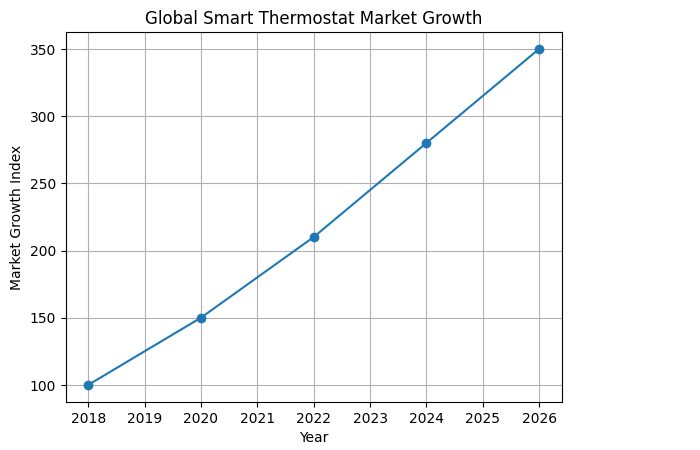
Global Smart Thermostat Market Growth
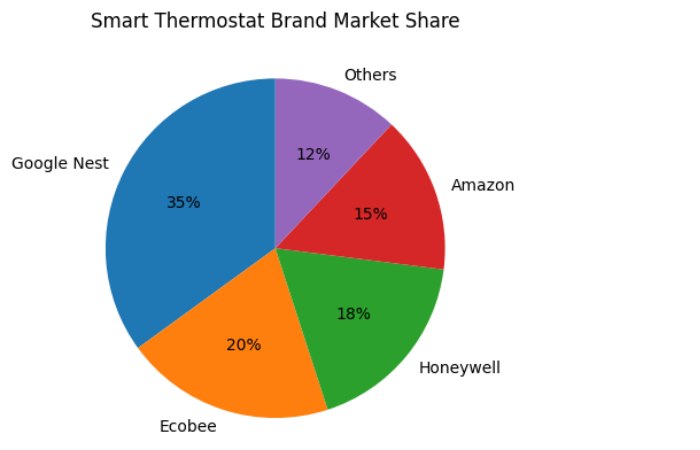
Smart Thermostat Brand Market Share
Smart Thermostats Is Best Known For:
-
Smart thermostats connect to Wi-Fi for remote control.
-
They automatically regulate heating and cooling systems.
-
Many devices integrate with voice assistants and smart home platforms.
-
Energy monitoring features help reduce electricity bills.
FAQs
What is the purpose of a smart thermostat?
A smart thermostat automatically controls heating and cooling systems while allowing remote management through mobile apps or voice assistants.
Do smart thermostats really save energy?
Yes. Studies show that smart thermostats can reduce heating and cooling energy consumption by automatically adjusting temperatures when homes are unoccupied.
Can smart thermostats work without Wi-Fi?
Most devices still function as basic thermostats without Wi-Fi, but remote control and automation features require internet connectivity.
Are smart thermostats compatible with all HVAC systems?
Not always. Compatibility depends on the wiring and type of heating or cooling system installed in the building.
Is installing a smart thermostat difficult?
Many devices are designed for DIY installation, but professional installation is recommended for complex HVAC systems.
Conclusion
Smart thermostats represent a significant advancement in home climate control technology by combining automation, connectivity, and energy efficiency. Unlike traditional thermostats, these devices allow homeowners to remotely manage temperature settings, create automated schedules, and monitor energy consumption through mobile applications. With growing interest in smart homes and sustainable energy use, smart thermostats are becoming increasingly popular in residential and commercial environments. When choosing a device, factors such as compatibility, connectivity, learning features, and price should be carefully considered. As smart home technology continues to evolve, smart thermostats will remain an essential tool for improving comfort while reducing energy costs.